Gas Meters with Zero Molecular Weight and Non-Zero Measurement
This analysis rule includes the gas mass/volume measurement elements with a zero molecular weight and a non-zero measurement. For meters that are in service, a zero molecular weight is abnormal and can be the result of a lab error or a data communication error. The use of a zero molecular weight will prevent the conversion of gas volume to mass. Since you can run the General Gross Error analysis as a validation step in the mass and volume balances, zero molecular weight is a potential gross error.
Any in-service gas meter with a non-zero measurement and a zero molecular weight is reported to the Case log, which you can view in the Log tab of the Case Properties window. The output contains a list of meters in violation, and a description of the violation.
The following table lists a sample log output for this analysis.
Sample Log
| Time | Severity | Element | Attribute | Message |
|---|---|---|---|---|
| 9/1/2005 10:05 | ...REPORTING METER WITH ZERO MW AND NONZERO MEASUREMENT | |||
| 9/1/2005 10:05 | Error | MeterB | MolecularWeight | MeasuredMass = 500 (kg) |
Analysis Method
- Collect a list of all gas meter elements in the current Case that satisfy the following criteria:
- Status Attribute value is IS (In Service)
- Determine the meter elements with a zero molecular weight and a non-zero measurement attribute.
- Write to the log section of the case. Report the test name and the Measurement Basis. Report the list of offending meters, ordered by name and cause of violation.
Configuration Using the Wizard
The configuration of the Gas Meters with zero molecular weight and non-zero measurement value is a selection of the General Gross Error Analysis Rule. You open the window for configuring the test (shown in the following figure) from the General Gross Error Analysis Rule Wizard.
Open the Gross Error Configuration window as described in Configuring - General Gross Error Analysis Rule.
On the Liquid/Gas Meters tab, select Gas meters with zero molecular weight and non zero measurement.
A Gas meters with zero molecular weight and non zero measurement - Attributes window opens.
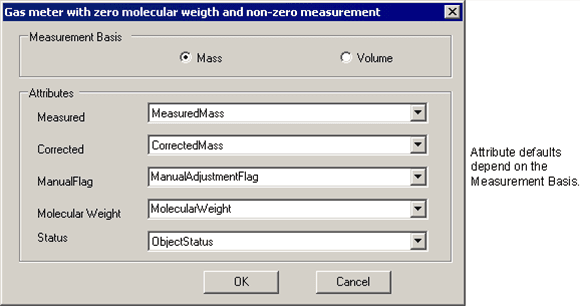
Select the measurement basis and the Attributes according to the following table:
Attributes
Selections Description Measurement Basis Select mass or volume basis. Measured Meter actual measurement. This defaults to 'MeasuredMass' or 'MeasuredVolume' depending on mass or volume selection. Corrected Meter corrected measurement. This defaults to 'CorrectedMass' or 'CorrectedVolume' depending on mass or volume selection. Manual Flag Flag to indicate if a corrected measurement was used for the meter. This defaults to 'ManualAdjustmentFlag', Molecular Weight Meter Molecular weight. The default is 'MolecularWeight'. Status Meter in/out of service status. This defaults to 'ObjectStatus'. Enter the Difference and Percentage Difference thresholds.
Click OK to finish the configuration.
The text "CONFIGURED" displays next to the 'Gas meters with zero molecular weight and non zero measurement' selection.
To run this test, see Running the General Gross Error Analysis.