Filling In the Input Attributes Tab
The Input Attributes tab contains the selection of calculation input Attributes for the Inventory, Meter, Transfer, and Composition Tracking elements in the model. These Attributes contain the measured and corrected measurements, as well as the measured and corrected tolerances on the measurement. The selected values and tolerances are the inputs to the Sigmafine Reconciliation engine and the Composition Tracking solver. If the Type in the Control Tab section is chosen as Mass, then all the Input and Output parameters are mass parameters. If Volume is chosen, then they are volume parameters.
Note: If the reconciled rule is selected, all fields on this tab are unavailable except for those under composition tracking.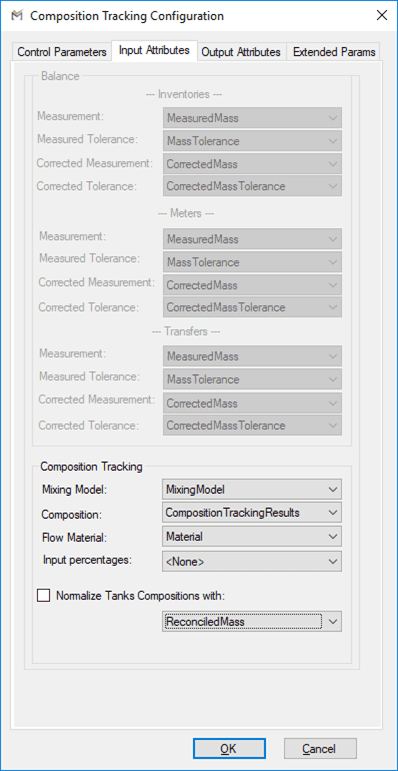
The following tables define the parameters configured on the Input Attributes tab.
Input Tab – Balance - Inventories, Meters, and Transfers
| Parameter | Description |
|---|---|
| Measurement | Element Attribute for measured mass or volume. |
| Measured Tolerance | Element Attribute for tolerance based on measurement. |
| Corrected Measurement | Use the same Attribute as Measurement. |
| Corrected Tolerance | Use the same Attribute as Measured Tolerance. |
Input Tab – Composition Tracking
| Parameter | Description |
|---|---|
| Mixing Model | Mixing Model Attribute for inventories. |
| Composition | Data Table Attribute for entering or viewing starting compositions. |
| Flow Material | Material Attribute for Flow element |
| Input Percentage | This configuration parameter allows to declare the transfer or flow Attribute designated to hold a data table containing fractions of materials to be communicated to the composition tracking solver. This is an alternative approach that can be used to carry in material composition on receipt transfers instead to declare one movement for each material. |
| Normalize Tanks Compositions with: (Attribute Name) | Select this option to have composition tracking result entries normalized to the value (mass or volume) recorded in the selected Attribute of the tank. |
Note:
Input percentages table formats
Two table formats are supported. Depending on which format is used, the composition tracking plug-in behaves differently.
Format 1:
| Column Name | Data Type |
|---|---|
| Material | String |
| Fraction | Double (Value between 0 and 1) |
Using this format, the plug-in will pass to the solver a transfer for each row where:
- StartTime = Start Time of the transfer
- EndTime = End Time of the transfer
- Material = Material in the table
- Quantity = Reconciled quantity of the transfer * Fraction in the table
Format 2:
| Column Name | Data Type |
|---|---|
| StartTime | Date Time |
| EndTime | Date Time |
| Material | String |
| Quantity | Double |
Using this format, the plug-in will pass to the solver a transfer for each row where:
- StartTime = StartTime in the table
- EndTime = EndTime in the table
- Material = Material in the table
- Quantity = Quantity in the table