Configuring the Viewer
Note: If you have already modified the Attribute of an element, then any changes made to the Element template are not automatically updated in that Attribute for the derived elements based on that template. Set the Attribute data reference to \<none> to allow for modification at the template level.
To configure the Viewer with the wizard:
Open System Explorer or Modeler.
Select an Element or Element template.
Click on the Attributes tab.
In either the Element or the Element template, select an Attribute with the Data Type of \<anything> and UOM of \<none>.
If you are using the Sigmafine Element templates, this Attribute name is CompositionTrackingResults and exists in the following templates:
SF_VolumeTankTemplate
SF_GaugedTankTemplate
SF_FlowTemplate
SF_TransferTemplate
For elements of category SF_Flow and SF_Transfer, composition data is read only and cannot be edited.
In the Data Reference column of the attribute, select the Composition Tracking Data Reference as shown in Figure 322.
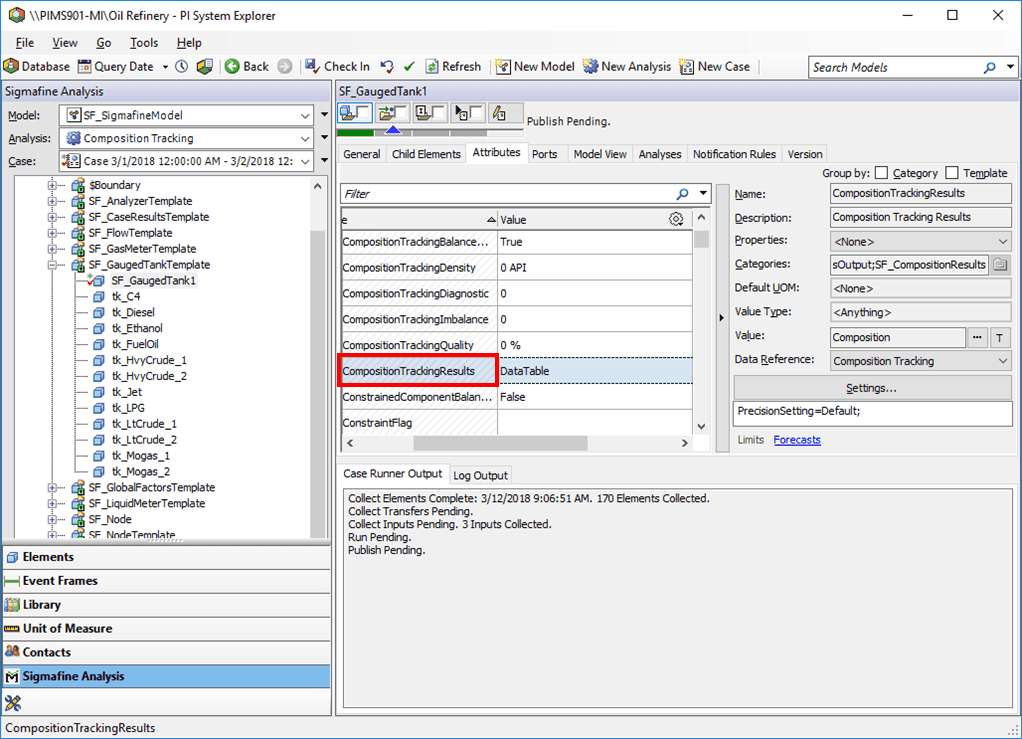
After the data reference selection, this data reference requires no further configuration. If you are not working in the context of a case, you are presented with a "This data reference does not work outside of Case context." message in the value field of the configured attribute.