Setting Sigmafine Scheduling Options
The AF time rules support a variety of analysis Case lengths and options. For the Sigmafine Balance the following Cases are supported:
- Contiguous (End-to End) Cases
- Overlapping or non-contiguous (not end-to-end) cases
Contiguous (End-to End) Cases
In contiguous cases, the end time of the previous Case is the start time of the next case. This can be a Case every hour, day, or month, or any other interval of time.
Below are some example end-to-end configurations based on the AF Periodic time rule.
 EXAMPLE: A Daily Case schedule
The Cases are created every day starting and ending at midnight (00:00).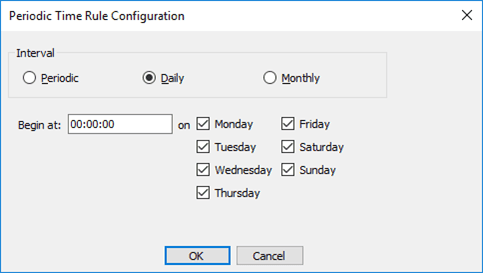
EXAMPLE: A Monthly Case schedule
The Cases are created every month, starting and ending at midnight (00:00) on the first day of the month. This configuration is therefore flexible about the length of the month.
EXAMPLE: A Daily Case schedule combining Saturday / Sunday starting at 7:00 AM
Both the start time during the day and the number of Cases per week are changed to meet the required Case schedule.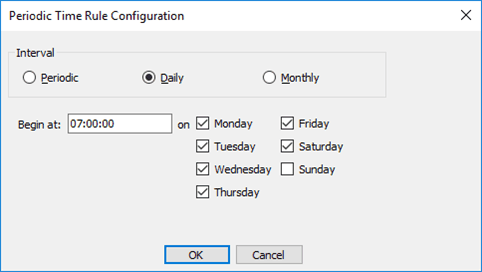
EXAMPLE: Eight-Hour Cases beginning at 6:00 AM
This is an example of creating a Case every work shift, starting at 6:00 AM.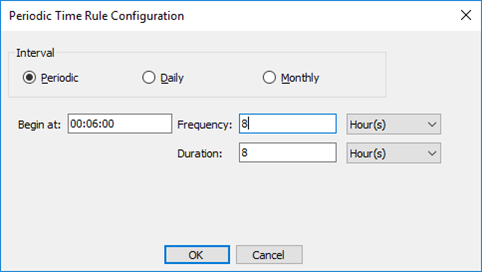
Overlapping (Non-Contiguous) Cases
For overlapping Cases or non-contiguous (not end-to-end) cases, the start time of the Case is not the end time of the previously created case. For overlapping cases (or non-end to end cases), more attention needs to be paid to those elements that use a change in value to create the quantity for the balance, such as inventory elements.
EXAMPLE: Hourly Cases every thirty minutes
EXAMPLE: An Eight-Hour Case every day beginning at 6:00
This is an example of creating a Case for a single work shift running every day, starting at 6:00 AM.
EXAMPLE: A Ten-Minute Case run every minute, beginning 30 seconds after the hour
To show the flexibility of the scheduling this example shows very high frequency scheduling (every minute) of a short Case length (10 minutes). Note that the Cases begin 30 seconds after the hour.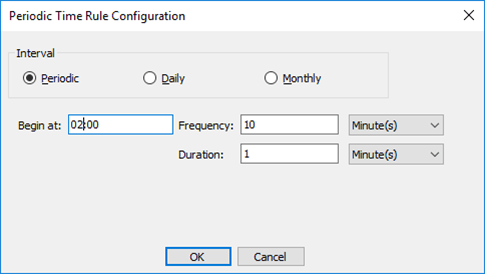
Note:
If inventories are included in the analysis and the opening inventory is selected to be obtained from the previous case, the end time will be the start time of the next case. This is because inventory information collected from the previous case (opening levels, for example) does not result in a valid calculation unless the start\end times are the same.
However, if the configuration states that the opening level will not be obtained from the previous case, thus calculated in the current case, overlapping or non-contiguous Cases are supported.