Filling In the Sigmafine Balance Control Tab
The Control tab contains the parameter settings that moderate the behavior of the Sigmafine Balance analysis rule, which includes:
- Calculations to perform and unit of measure options.
- Solution Convergence Parameters, if applicable.
- Calculation output and diagnostic options.
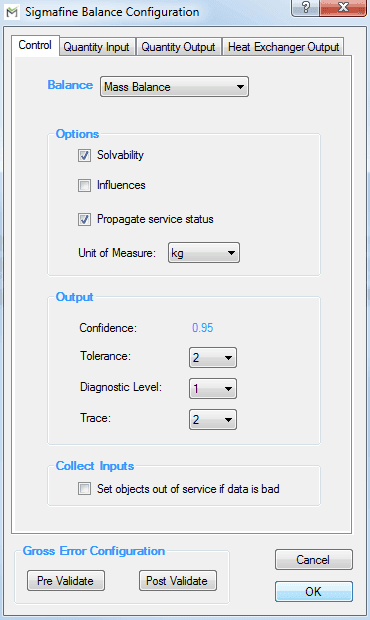
The following table defines the parameters configured on the Control tab.
Control Parameters Tab – Balance
| Parameter | Description |
|---|---|
| Balance | Select the balance. The SF_SigmafineBalance table contains the available balance selections. This selection changes the measurement basis of the balance as well as the default Attribute names on the remaining configuration tabs. |
| Solvability | Select for Sigmafine to do a solvability analysis and report the solvability for the flows, transfers, and inventories. |
| Influences | Select to calculate the impact that each flow, inventory, and transfer measurement has on the final reconciled solution. |
| Propagate Service Status | Select for Sigmafine to set balance type elements to out of service if all connected elements are also set to out of service, or set all connected elements out of service if balance point is out of service. |
| Unit of Measure | Selects the input unit to the Sigmafine Reconciliation Solver. This is also the unit used in reporting to the log file. |
| Confidence | Read-only field displays the confidence calculation, which is derived from the tolerance setting. Setting the tolerance to 2 means the confidence is 0.95, if the tolerance is set to 3 then the confidence is 0.99. |
| Tolerance | Select the number of standard deviations for which tolerance of the measurement is to be defined. |
| Diagnostic Level | 0: No diagnosis analysis.1: Auto-diagnosis. The two most severe measurement errors will be noted in the log file. Trace must also be set to 1. If Trace is set to 2, then details of all severe errors are listed in the log file.2: Auto-rejection. The most severe measurement errors will be marked as out of service; reconciliation calculation is performed again with the next measurement, with severe the error placed out of service. Process is repeated until the severity of the balance points is between –1 and 1, inclusive. |
| Trace | 0: No trace analysis.1: Details of the two most severe measurement errors are noted in the log file.2: Details of all measurement errors with a severity greater than the tolerance are noted in the log file. |
| Set object out of service if data is bad. | Checked: the object service status is set ‘OS’ whenever a bad data is detected during the Collect Inputs. Default is unchecked. |
| Pre / Post Validate | For mass and volume balances, you can do two types of gross error checks on the Sigmafine Model Case data: pre-validation and the post-validation. The pre-validation performs checks on the measured data and the Model configuration. The post-validation performs checks on the reconciled results. When the basis of the Sigmafine Analysis is selected to be other then mass or volume, the Pre and Post Gross error checks are not available. Click to configure the Gross Error Analysis Rules, as described in the Gross Error Analysis Rule\topic. |
Control Tab - Output
| Parameter | Description |
|---|---|
| Confidence | Read-only field displays the confidence calculation, which is derived from the tolerance setting. Setting the tolerance to 2 means the confidence is 0.95, if the tolerance is set to 3 then the confidence is 0.99. |
| Tolerance | Select the number of standard deviations for which tolerance of the measurement is to be defined. |
| Diagnostic Level | 0: No diagnosis analysis.1: Auto-diagnosis. The two most severe measurement errors will be noted in the log file. Trace must also be set to 1. If Trace is set to 2, then details of all severe errors are listed in the log file.2: Auto-rejection. The most severe measurement errors will be marked as out of service; reconciliation calculation is performed again with the next measurement, with severe the error placed out of service. Process is repeated until the severity of the balance points is between –1 and 1, inclusive. |
| Trace | 0: No trace analysis.1: Details of the two most severe measurement errors are noted in the log file.2: Details of all measurement errors with a severity greater than the tolerance are noted in the log file. |
| Set object out of service if data is bad. | Checked: the object service status is set ‘OS’ whenever a bad data is detected during the Collect Inputs. Default is unchecked. |
| Pre / Post Validate | For mass and volume balances, you can do two types of gross error checks on the Sigmafine Model Case data: pre-validation and the post-validation. The pre-validation performs checks on the measured data and the Model configuration. The post-validation performs checks on the reconciled results. When the basis of the Sigmafine Analysis is selected to be other then mass or volume, the Pre and Post Gross error checks are not available. Click to configure the Gross Error Analysis Rules, as described in the Gross Error Analysis Rule\topic. |